Most businesses I talk to at SaleForgers do not start by asking for custom software. They start by describing a week: orders copied from one app to another, stock counted by hand on Friday, a spreadsheet that only one person understands. The question underneath is always the same. Should we keep buying tools, or build something that fits?
Here is the way I help teams answer it.
Start with fit, not features
Write down your real workflow from the first step to the last: how a purchase arrives, how stock is recorded, how a sale is invoiced, how money is reconciled. Then hold each tool you are considering against it.
- If a mainstream tool covers roughly 80 percent of that workflow and the rest is admin you can live with, buy it.
- If the missing 20 percent is where you actually make money, build that part.
A retail client does not win because of how invoices are numbered. They might win because of how quickly they reorder the right stock. That second thing is worth owning.
Count the workarounds
Workarounds are the hidden cost of SaaS that does not fit. Every export, re-import, copy-paste and manual check is a small tax paid every day. Add them up for a month:
- How many hours go into moving data between tools?
- How many errors come from it, and what does fixing them cost?
- Which decisions are delayed because a report has to be assembled by hand?
When that number is larger than the cost of building and maintaining a focused system, the decision is made for you.
Look at the integrations
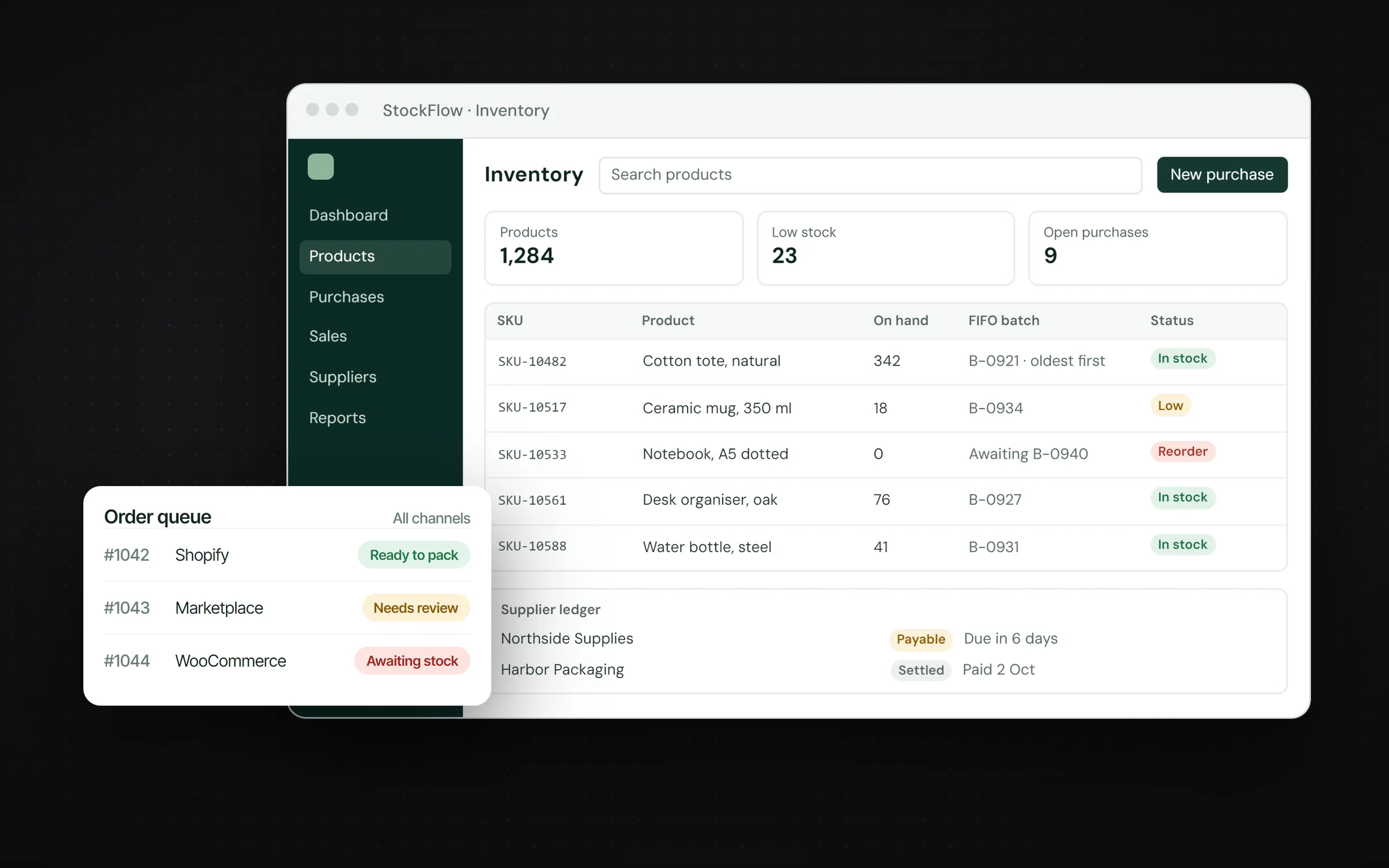
Five subscriptions that do not talk to each other are not five solutions. They are one problem split five ways. StockFlow, a system I delivered for a retail operation, exists because purchasing, stock, sales and ledgers had to move together: a purchase changes the stock picture, a sale connects stock with an invoice and a customer, and returns feed back into operations. When the connections are the product, custom usually wins.
Ask who owns the data
With SaaS, your data lives in someone else's schema and leaves through someone else's export button. That is fine for many things. It is not fine when the data is the business: customer ledgers, pricing history, operational records. A custom system keeps that data in a database you control.
Be honest about maintenance
Custom software is not free after launch. It needs hosting, updates and someone who understands it. I plan that from the start: automated deployments, a clear data model and support agreed as part of the engagement. When I built Hexenex ERP, every push to the main branch built the API and the web app and released them atomically, so updates stayed routine instead of risky.
The hybrid that usually works
The best answer is often both:
- Buy commodity pieces: email, accounting, payments, the storefront.
- Build the core workflow that makes you different, and connect it to the tools you bought.
That keeps the custom part small, valuable and maintainable.
A quick scoring checklist
Score each statement from 0 (not true) to 2 (very true). Add them up.
- Our core workflow is different from how most companies in our industry work.
- We pay for three or more tools that hold copies of the same data.
- Someone spends hours every week moving data between systems.
- Mistakes from manual steps cost us money or customers.
- Our data is part of what makes the business valuable.
- Per-seat SaaS pricing will grow faster than our revenue.
- We have someone, internally or a partner, to own a system after launch.
A score of 0 to 4 usually means buy. Five to 9 means buy the commodity parts and build the core. Ten or more means the workflow is your product, and it deserves software that fits it.
Costs to compare over three years
Compare total cost, not the first invoice:
- SaaS: subscriptions per seat, add-ons, integration tools, and the hours your team spends on workarounds.
- Custom: the build, hosting, maintenance and improvements over the same period.
Per-seat pricing grows with your team, while a custom system's running cost mostly grows with usage. Hours lost to workarounds are the line most people forget, and often the largest.
Red flags in both directions
Signs SaaS is failing you:
- Reports are rebuilt by hand in spreadsheets every month.
- The team has rules like "never edit this field" to keep two tools in sync.
- You delay a process change because the software cannot follow it.
Signs custom would be overkill:
- Your process is standard and stable.
- Nobody can own the system after launch.
- The pain is a missing feature a vendor already offers.
What a good written scope contains
- The workflow today and the workflow after, step by step.
- The modules that will exist and the order they ship in.
- What the system replaces and what it connects to.
- Who owns the code, the data and the hosting.
- How support and improvements work after launch.
How I scope it
Every SaleForgers project starts with a free call and no technical brief. Before anything is built, you get a written scope: what will exist, what it replaces and why. If buying is the better answer, the scope says so.
If you are weighing this decision right now, tell me about the workflow and the problem behind it.